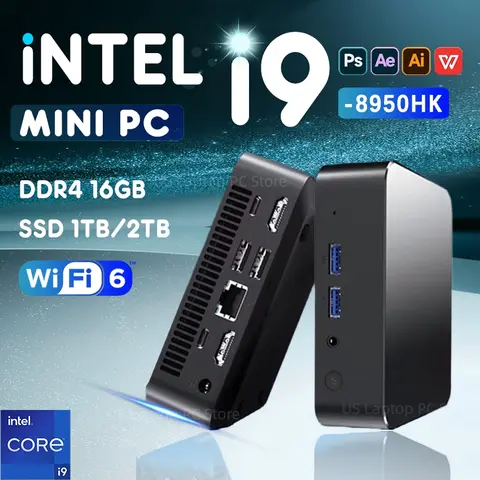
What is a Windows Mini Computer and How Can It Help Me?
The answer is: A
Windows mini computer is a compact, full-featured desktop PC that runs the Windows operating system and is ideal for users who need a powerful yet space-saving computing solution. A Windows mini computer is a small form-factor desktop that delivers the performance of a traditional PC in a much smaller package. It is especially useful for users who need a Windows-based system but have limited desk space or are looking for a portable solution that can be easily moved between locations. Here’s how it can help you:
- Windows Mini Computer
- A compact desktop PC that runs the Windows OS and is designed for efficiency and portability.
- Mini Windows PC
- Another term for a Windows mini computer, often used interchangeably.
- Mini PC on Windows
- Describes a small computer that uses the Windows operating system for full compatibility with Windows software and hardware.
Let’s consider a real-life scenario: You are a graphic designer who works from home and also travels for client meetings. You need a powerful system to run design software like Adobe Photoshop and Illustrator, but you also want something that can fit in your laptop bag and connect to any monitor.
- Choose a Windows mini computer with at least an Intel i5 processor and 16GB RAM for smooth performance.
- Ensure it has multiple ports (HDMI, USB, Ethernet) for connecting to external displays and peripherals.
- Opt for a model with Windows 11 for the latest features and improved multitasking capabilities.
How Do I Choose the Best Windows Mini Computer for My Needs?
The answer is: To choose the best Windows mini computer, consider your usage scenario, performance requirements, and connectivity needs. If you're a student or a home user who needs a basic system for web browsing, streaming, and light productivity, a budget-friendly Windows mini computer with an Intel Celeron or Pentium processor may be sufficient. However, if you're a professional who needs to run resource-intensive software, you should look for a model with a more powerful processor and at least 16GB of RAM. Here’s a comparison of three popular models:
| Model | Processor | RAM | Storage | Operating System | Price Range |
| Mini Windows PC A | Intel Celeron N4500 | 8GB | 256GB SSD | Windows 10 | $150–$200 |
| Mini Windows PC B | Intel i5-1235U | 16GB | 512GB SSD | Windows 11 | $300–$400 |
| Mini Windows PC C | Intel i7-1265U | 32GB | 1TB SSD | Windows 11 | $500–$600 |
For example, if you're a small business owner who needs to run accounting software and manage multiple browser tabs, the Mini Windows PC B would be the best choice due to its balanced performance and Windows 11 compatibility.
What Are the Common Issues with Windows Mini Computers and How Can I Fix Them?
The answer is: Common issues include overheating, driver compatibility, and limited storage, but these can be resolved with proper setup and maintenance. One of the most common problems users face with Windows mini computers is overheating, especially when running demanding applications for extended periods. This is due to the compact design, which can restrict airflow. To fix this:
- Ensure the mini PC is placed on a hard, flat surface with adequate ventilation.
- Use a cooling pad or external fan if the system is used for long hours.
- Keep the system updated with the latest drivers and firmware from the manufacturer’s website.
Another issue is driver compatibility, especially when connecting external devices like printers or graphics cards. To avoid this, always install the latest drivers from the manufacturer’s support page. Lastly, limited storage is a concern for users who need to store large files. You can expand storage by using an external SSD or upgrading the internal storage if the model allows.
User Reviews and Experiences with Windows Mini Computers
The answer is: Most users are satisfied with the performance and portability of Windows mini computers, especially when used for everyday tasks and light productivity. Many users have reported that the Windows mini computer is a great alternative to traditional desktops, especially for those who need a compact and powerful system. For example, one user who runs a small online store praised the
mini PC on Windows for its ability to handle multiple browser tabs and run inventory management software without lag. However, some users have noted that the mini windows pc can be noisy when under load, and the lack of internal expansion options can be a limitation for power users. Overall, the Windows mini computer is a reliable and efficient solution for a wide range of users, from students to professionals. It offers the full Windows experience in a compact form factor, making it a versatile choice for modern computing needs.
Other Products You Might Be Interested In
If you're interested in Windows mini computers, you may also want to explore related products such as
Windows mini laptops, mini Windows desktops, and
mini win PCs. These devices offer similar functionality but in different form factors. For example, a
Windows mini laptop is ideal for users who need a portable all-in-one solution, while a
mini window computer is better suited for users who prefer a desktop setup with a separate monitor. If you're looking for a lightweight and compact option, consider a
mini win pc with Windows 10 or Windows 11. These models are often used in home offices, classrooms, and small businesses where space is limited but performance is still a priority.