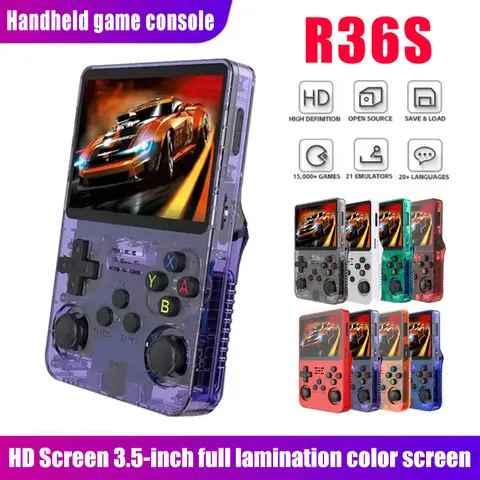
What Is a Tiny GameBoy and Why Should I Consider Buying One?
The
Tiny GameBoy is a compact, portable gaming console that delivers a nostalgic gaming experience in a small, lightweight form factor. It is ideal for users who want to enjoy classic or modern games on the go without carrying a bulky device. If you're a retro gaming enthusiast or someone who loves handheld gaming, the Tiny
GameBoy is a great option. It supports a variety of game formats and often includes built-in games or the ability to load external cartridges or digital titles.
- Tiny GameBoy
- A small, portable gaming console that mimics the design and functionality of the original GameBoy but in a more compact and modernized form.
- Mini GameBoy
- A smaller version of the classic GameBoy, often used interchangeably with Tiny GameBoy in the gaming community.
To determine if a Tiny GameBoy is right for you, consider the following:
- Assess your gaming preferences—do you enjoy retro games or modern indie titles?
- Check the device's compatibility with game formats such as .rom files or physical cartridges.
- Consider the battery life and screen size to ensure it fits your on-the-go lifestyle.
In my experience, the Tiny GameBoy is a perfect companion for long commutes or travel. I often use it during train rides to play classic titles like Tetris or Super Mario Land. The device is easy to carry and has a surprisingly long battery life for its size.
How Do I Choose the Best Tiny GameBoy for My Needs?
Choosing the best Tiny GameBoy depends on your specific needs, such as game compatibility, screen size, battery life, and design preferences. The best approach is to compare models based on these factors. Here’s a comparison of three popular Tiny GameBoy models:
| Model | Screen Size | Battery Life | Game Compatibility | Price Range |
| Tiny GameBoy Classic | 2.4 | 8–10 hours | Original GameBoy games | $20–$30 |
| Mini GameBoy Pro | 3.5 | 6–8 hours | GameBoy Color and GameBoy Advance games | $40–$50 |
| Micro GameBoy | 2.8 | 10–12 hours | Supports .rom files and cartridges | $30–$40 |
To choose the best Tiny GameBoy for you:
- Identify the types of games you want to play—some models support only original GameBoy titles, while others support more modern formats.
- Check the screen size and resolution to ensure it meets your visual preferences.
- Look for models with longer battery life if you plan to use it for extended periods.
I personally prefer the
Micro GameBoy for its versatility and long battery life. It allows me to play both classic and newer titles, and the screen is large enough to enjoy without eye strain.
What Are the Common Issues with Tiny GameBoy and How Can I Fix Them?
One of the most common issues with Tiny GameBoy devices is screen flickering or unresponsive buttons. These problems can often be resolved with simple troubleshooting steps. Here are some common issues and their solutions:
- Screen Flickering
- Caused by low battery or a loose screen connection. Recharge the device or check the internal connections if you're comfortable opening it.
- Unresponsive Buttons
- May be due to dirt or debris under the buttons. Clean the device with a soft cloth and compressed air.
- Short Battery Life
- Could be due to a faulty battery or high screen brightness. Adjust the brightness or replace the battery if necessary.
To fix these issues:
- Ensure the device is fully charged before use.
- Clean the buttons and screen regularly to prevent dirt buildup.
- Adjust the screen brightness to a comfortable level to conserve battery life.
I once had an issue with my Tiny GameBoy where the screen would flicker after a few minutes of use. I found that the battery was low, and after a full charge, the problem was resolved. Regular maintenance can go a long way in keeping your Tiny GameBoy in top condition.
What Do Users Say About Tiny GameBoy and Related Products?
User reviews for Tiny GameBoy and related products are generally positive, with many praising the device's portability and nostalgic appeal. However, some users have reported issues with screen quality and game compatibility. Here are some common user sentiments:
| Product | Pros | Cons |
| Tiny GameBoy Classic | Compact, long battery life, authentic design | Small screen, limited game compatibility |
| Mini GameBoy Pro | Better screen, supports more games | Shorter battery life, higher price |
| Micro GameBoy | Versatile, good battery life | Some users report screen issues |
Many users also mention that the Tiny GameBoy is a great gift for children and retro gaming fans. Some have even used it as a backup device for travel or as a secondary gaming console. If you're interested in similar products, you might also want to explore
Tiny Arcade Game devices or
GameBoy Toy versions that are designed for younger audiences. These products often include simplified controls and educational games.
Other Products You Might Be Interested In
If you're into Tiny GameBoy, you might also enjoy exploring other related products such as
Tiny Tiny Game,
GameBoy Mini, GameBoy Games, and GameBoy Arcade. These products offer similar retro gaming experiences but with different features and price points. For example,
the GameBoy Mini is a smaller version of the original GameBoy, while the
Tiny Tiny Game is a budget-friendly option for casual gamers.
The GameBoy Arcade is a more advanced version that supports a wider range of games and has a larger screen. Exploring these options can help you find the perfect gaming device that fits your lifestyle and preferences.